

Think of territories as a geographical area that one or two techs will cover. It will consist of routes, each with stops.
Technitions are assigned to a territory. They are responsible for the establishments in that territory.
Territories can be called whatever you think is best to identify them easily.
Some ideas could be:
Direction: North, South, East, West
Part of the city: Uptown, Downtown, Central, Riverside
Suburb: Bronx, Manhattan, Long Island
You should avoid using the tech's name for the territory: George, Matt, Will... Note that this will require a name change if the tech changes or if the tech changes territories. Throughout the site, the tech’s name is usually listed with the territory.
How To Create A Territory
Go to the Territory Manager page.
Tap on +Create.
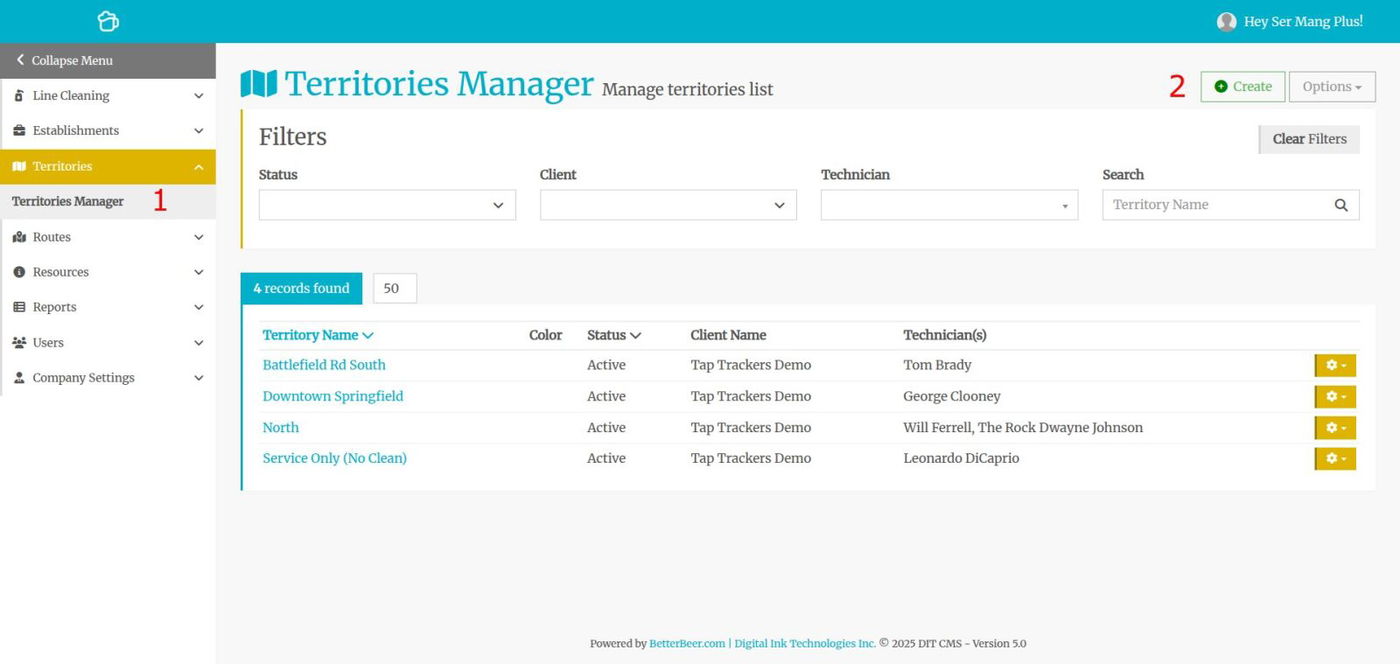
Name the territory (see above).
Enter the technician(s) name. Use Technician 2 if you have two techs in this territory or a trainee tech. You can always edit/change the techs in a territory.
Pick a color for this territory.
Hit Save.
One Man Company - Solo Operator
If you are solo and don’t have any techs, you should start with one territory. All of your establishments will belong to that single territory. As always, establishments can belong to different routes, but they all belong under one territory.
You can easily move an establishment from one territory to another when you get to the time you need to add a tech and another territory.
Update A Territory
Click on the gear icon on the right, then select Update OR click on the name of the territory.