

If you clean lines for a distributor or brewery, you will want to send them an invoice at the end of each billing cycle.
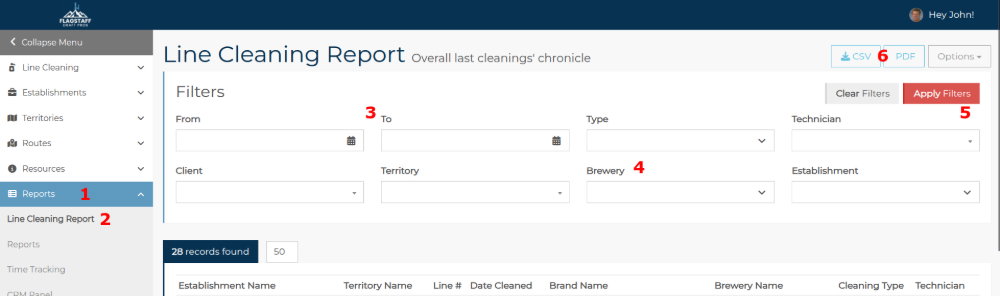
Go to Reports on the main menu.
Click Line Cleaning Report.
Select the From and To dates using the date picker (calendar icon) in the date fields.
Select the brewery or breweries from the Brewery drop-down list (you can select multiple for a combined report).
You can also filter by technician (who recorded the line as cleaned) and by cleaning type (Caustic or Acid). If you want only one establishment, search for it in the Establishment drop-down list.Click Apply Filters.
Save the report as a CSV or PDF.
NOTE: Do not try to save a PDF with 1000 or more lines; you will crash the server! ☠
The line cleaning report lists all the lines you cleaned during that period. If you cleaned a line more than once, it will show that.
This is not to be confused with Line Cleaning Status, which shows each line and the colour status it is in at that moment - red, yellow, green. The Status report will only show whether it is overdue. It is not a report of the number of lines you cleaned.