

If you do not use QuickBooks, you should have a list of your parts and services uploaded into Tap Trackers. This way, you can add them to cleans and service calls.
Your accountant (or whoever you listed as your accountant on the Set Up Form) will receive an email with the details of each sale after it is saved.
Since there are a million different tax codes and structures, we do not calculate or include tax.
Manually Creating Parts & Services
Categories
Each part or service will belong to a category.
Examples of Categories could be:
Couplers
Faucets
Line cleaning fees
Hourly Fees/Labor/Truck Charges
Chiller Parts
Creating New Part/Service
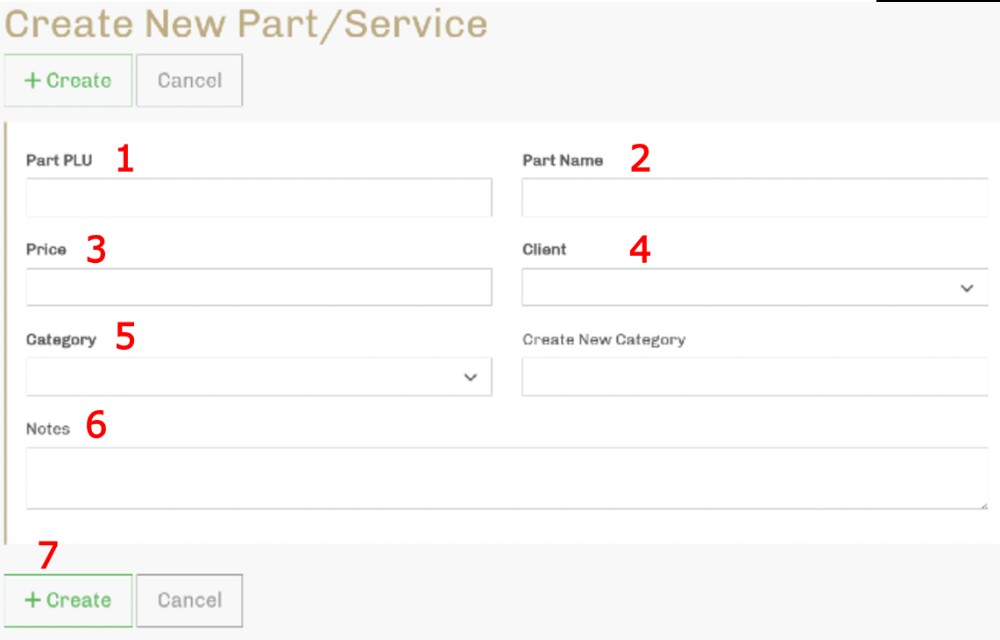
Enter the PLU - A PLU is a Part Look-up Number. Usually, a short code to represent the part. Useful for using when searching or if your invoicing software uses them as well. PLUs are mandatory. It should be no longer than 5 characters.
Part Name - Ex: “100% 304-grade Stainless Steel Domestic Faucet”
Price per unit.
Select your company name from the drop-down list.
Select the Category from the drop-down list. OR create a new Category by entering it in the text box next to the drop-down list.
Add any notes about the part/service.
Click +Create
Parts & Services Template - Bulk Upload
If you are a new client, using the template is a much faster way to get your parts and services into Tap Trackers.
Please fill out the Parts and Services Template so we can upload it into Tap Trackers for you.
https://docs.google.com/spreadsheets/d/1HYeNXE3rr_KJ_eIDJ6_Loq67BxZvfVLJK7tGlrRY1_U/copy
You will need a Google Account to work with that template. If you do not have one, let us know and we can send you an Excel version.
There are four tabs at the bottom:
EXAMPLE Categories
EXAMPLE Items
Your Categories
Your Items
Use sheets 1 and 2 as examples for your parts and services in sheets 3 and 4.
Once complete, email it to Steve.
You can always add, edit, and delete both parts and services and categories.